

WebExtrator Web Rendering API Integration Guide
POST https://api.pingesoft.com/webextrator/render
Provide a URL to the WebExtrator Web Rendering API, and receive fully rendered HTML (including JS-injected content), plain text, the page title, and the final URL.
For structured extraction results (such as article content, product prices, recipe ingredients, etc.), use
/webextrator/extract.
¶ Application Process
To use the WebExtrator service page, first go to the 品格AI Console to obtain your API Token and keep it for later use.
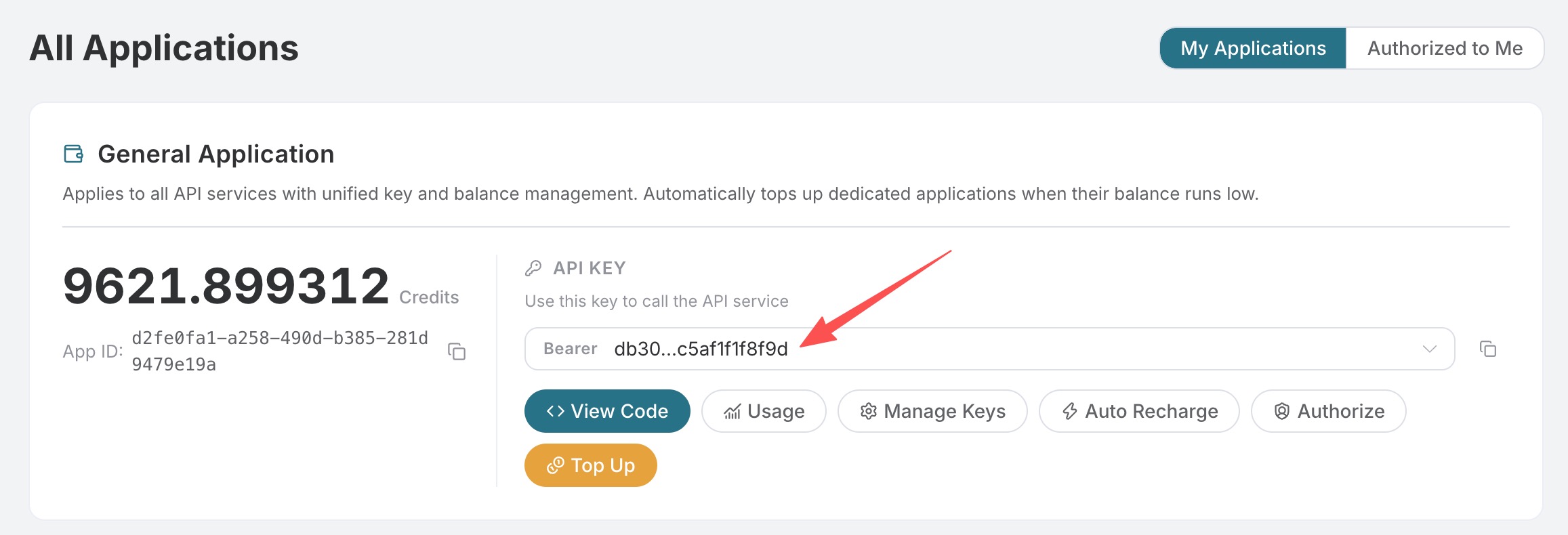
If you have not logged in or registered, you will be automatically redirected to the login page inviting you to register and log in. After completion, you will automatically return to the current page.
One API Token can invoke all services on the platform; there is no need to apply separately for each service. Your first application includes free credits for a free trial; when credits are insufficient, you can recharge your general balance in the Console.
📘 Full documentation: WebExtrator Service Page →
¶ Authentication
All WebExtrator interfaces use standard Bearer Token authentication:
Authorization: Bearer YOUR_API_KEY
Content-Type:  application/json
¶ Request Parameters
| Field | Type | Required | Default | Description |
|---|---|---|---|---|
url |
string | ✅ | — | The page URL to render must be http(s)://. |
user_agent |
string | ❌ | Auto-select | Custom User-Agent. |
timeout |
integer | ❌ | 30 |
Timeout for a single navigation (positive integer in seconds). |
wait_until |
enum | ❌ | load |
Load completion event: load / domcontentloaded / networkidle / commit. |
delay |
integer | ❌ | 0 |
Additional wait time in seconds after wait_until is triggered (non-negative integer) (for secondary SPA rendering). |
wait_for_selector |
string | ❌ | — | Wait for this CSS selector to appear; more reliable than networkidle. |
block_resources |
string[] | ❌ | ["image","font","media"] |
Resource types to block, optional: image / font / media / stylesheet / xhr / fetch. |
headers |
object | ❌ | — | Additional HTTP request headers (for example, {"Accept-Language": "en-US"}). |
cookies |
array | ❌ | — | Cookies injected before navigation; see the structure below. |
callback_url |
string | ❌ | — | Callback URL in asynchronous mode. When the task is complete, the platform sends the POST complete result to this address. |
bypass_cache |
boolean | ❌ | false |
Skip cache reads (the result of this request will still be written back to the cache). |
cache_ttl_seconds |
integer | ❌ | 3600 |
Custom cache TTL for this write. Pass 0 to avoid caching this response. |
async |
boolean | ❌ | false |
Set to true to return task_id immediately; retrieve the result via callback_url or the Tasks API. |
Request parameters consistently use snake_case.
¶ Cookie Structure
{
  "name":      "string",
  "value":     "string",
  "domain":    "string",
  "path":      "/",
  "expires":   1735689600,
  "httpOnly":  false,
  "secure":    true,
  "sameSite":  "Lax"
}
¶ Synchronous Response
{
  "success": true,
  "task_id": "550e8400-e29b-41d4-a716-446655440000",
  "trace_id": "550e8400-e29b-41d4-a716-446655440001",
  "started_at": 1777717800.123,
  "finished_at": 1777717801.234,
  "elapsed": 1.111,
  "data": {
    "kind": "render",
    "url": "https://example.com",
    "finalUrl": "https://example.com/",
    "title": "Example Domain",
    "status": 200,
    "html": "<!DOCTYPE html><html>...</html>",
    "text": "Example Domain\nThis domain is for use in illustrative examples...",
    "userAgent": "Mozilla/5.0 ...",
    "elapsedMs": 1108
  }
}
| Field | Type | Description |
|---|---|---|
data.kind |
string | Fixed as "render". |
data.url |
string | The URL you submitted. |
data.finalUrl |
string | The final URL after following redirects. |
data.title |
string | The rendered document.title. |
data.status |
number | null | The HTTP status code of the main navigation. |
data.html |
string | Complete rendered HTML. |
data.text |
string | document.body.innerText snapshot (use Extract for cleaner body content). |
data.userAgent |
string | The UA actually used. |
data.elapsedMs |
number | Browser rendering time only. |
data.cached |
boolean? | true when the cache is hit. |
data.cacheStoredAt |
number? | Unix timestamp in milliseconds when the cache entry was first written. |
¶ Asynchronous Response
When async=true (or callback_url is provided), it immediately returns (HTTP 200):
{
  "success": true,
  "task_id": "550e8400-...",
  "trace_id": "6ba7b810-...",
  "started_at": 1777717800.123
}
The result will be pushed via POST to callback_url (if configured), or actively queried through
/webextrator/tasks.
¶ Callback Structure
The platform POSTs an envelope identical to synchronous mode to callback_url,
with Content-Type: application/json. Returning any 2xx is considered acknowledged; 5xx will be
retried with exponential backoff for approximately 5 minutes.
¶ Error Responses
| HTTP | error.code |
Meaning |
|---|---|---|
| 400 | bad_request |
Invalid request parameters (for example, missing url or an incorrect type). |
| 401 | unauthorized |
Missing or invalid Authorization: Bearer …. |
| 402 | (x402) | Insufficient platform balance; returns an x402 payment-required envelope. |
| 408 | timeout |
Navigation exceeded timeout. |
| 429 | queue_busy |
The synchronous queue is congested. Please retry or use async=true instead. |
| 500 | internal_error |
Service error. Please try again later. |
Error structure:
{
  "success": false,
  "task_id": "...",
  "trace_id": "...",
  "started_at": 1777717800.123,
  "finished_at": 1777717800.135,
  "elapsed": 0.012,
  "error": { "code": "bad_request", "message": "url: Invalid url" }
}
¶ Examples
¶ cURL
curl -X POST https://api.pingesoft.com/webextrator/render \
  -H "Authorization: Bearer $API_KEY" \
  -H "Content-Type: application/json" \
  -d '{
    "url": "https://example.com",
    "wait_until": "networkidle",
    "block_resources": ["image", "media", "font"]
  }'
¶ Python (requests)
import os, requests

API_KEY = os.environ["ACEDATA_API_KEY"]

resp = requests.post(
    "https://api.pingesoft.com/webextrator/render",
    headers={
        "Authorization": f"Bearer {API_KEY}",
        "Content-Type": "application/json",
    },
    json={
        "url": "https://example.com",
        "wait_until": "networkidle",
        "block_resources": ["image", "media", "font"],
    },
    timeout=60,
)
resp.raise_for_status()
data = resp.json()["data"]
print(data["title"], data["status"], len(data["html"]))
¶ Node.js (fetch)
const apiKey = process.env.ACEDATA_API_KEY;

const res = await fetch('https://api.pingesoft.com/webextrator/render', {
  method: 'POST',
  headers: {
    Authorization: `Bearer ${apiKey}`,
    'Content-Type': 'application/json',
  },
  body: JSON.stringify({
    url: 'https://example.com',
    wait_until: 'networkidle',
    block_resources: ['image', 'media', 'font'],
  }),
});
const { data } = await res.json();
console.log(data.title, data.status, data.html.length);
¶ Async + Callback
curl -X POST https://api.pingesoft.com/webextrator/render \
  -H "Authorization: Bearer $API_KEY" \
  -H "Content-Type: application/json" \
  -d '{
    "url": "https://example.com",
    "async": true,
    "callback_url": "https://your-app.example.com/hooks/webextrator"
  }'
Immediately returns { "success": true, "task_id": "...", "trace_id": "...", "started_at": 1777717800.123 };
when the task is completed, the platform will POST the full result to your callback_url.
¶ Force Cache Bypass
curl -X POST https://api.pingesoft.com/webextrator/render \
  -H "Authorization: Bearer $API_KEY" \
  -H "Content-Type: application/json" \
  -d '{
    "url": "https://example.com",
    "bypass_cache": true
  }'
¶ Tips and Pitfalls
- Choosing the right
wait_untilis important.networkidleis the most stable but slowest;domcontentloadedis fast but may miss asynchronously injected content;loadis suitable for traditional static pages. - The cache Key ignores
async. Synchronous and asynchronous requests for the same URL hit the same cache entry, so switching freely will not invalidate it. - The cache Key ignores
bypass_cacheandcache_ttl_seconds. These two are operation switches, and do not affect the response content. cookiesandheadersseparate cache buckets. Customizing these two will cause the first hit for the same combination to fail.- Heavy SPAs often exceed the default 30 seconds. It is recommended to use
timeout: 60,wait_until: "domcontentloaded",delay: 4, together withwait_for_selectorto wait for the elements you actually care about. block_resourcesis the fastest path to reducing latency. Images / fonts / media are blocked by default; if your extraction does not rely on CSS layout, addingstylesheetcan make it even faster.